
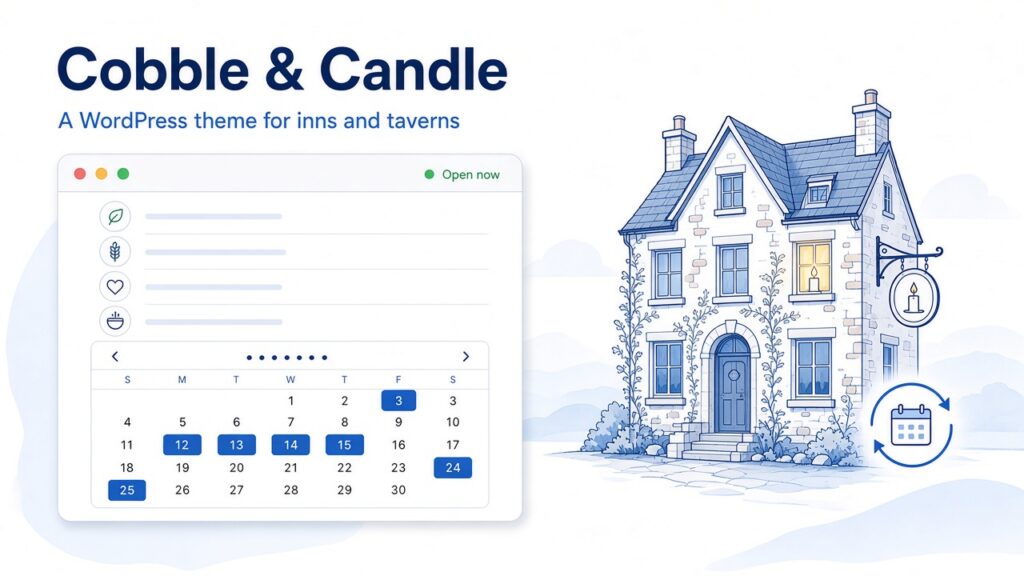
Cobble & Candle is a WordPress theme for inns, taverns and restaurants. I built it in public as sample work, to show what a full WordPress product looks like from start to finish. It is not a client site.
I have been doing web work for about 17 years. I am a self-taught WordPress developer in Gettysburg, PA. I build custom themes and plugins, and I take on overflow work for agencies. This project brings all of that together: a block theme, a plugin, a booking engine, a setup wizard, documentation and tests.
The live demo is at cobbleandcandle.matthummel.com. The code is on GitHub. The demo content is fictional.
What Cobble & Candle is
Cobble & Candle is a block theme for places that serve food and drink, and sometimes have rooms upstairs.
Guests can see whether the place is open right now, filter menus by diet, and request a table or a room. Owners set it up with a five-step wizard and confirm bookings from the dashboard.
It comes in two parts:
- The Cobble & Candle theme. It has 28 custom blocks and four style variations.
- The Cobble & Candle Core plugin. It’s bundled with the theme and installs with one click. It holds the content: locations, hours, menus, events, rooms, bookings and messages.
Why I built it
Hospitality sites go out of date quickly. Hours change on holidays, and menus change often. Many restaurant themes are page-builder demos with static text. An inn with a restaurant usually also needs a separate booking plugin and a calendar sync service.
I wanted one theme that handled all of that inside WordPress.
Who this WordPress theme for inns is for
I had four groups in mind:
- Restaurant owners who want menus, hours and bookings to stay correct without a developer.
- Taverns and bars that depend on events and specials.
- Inns and B&Bs that need a real availability calendar and booking requests.
- Agencies and freelancers who want to give a client a site they can edit safely.
Key features
Rooms and stays
Most restaurant themes need a separate plugin for room bookings. Here they are built in, so I’ll go through them in detail.
You turn rooms on by adding one in the dashboard. Once you have at least one room, three things appear on their own: a Rooms page, a “Stay with us” section on the home page, and a Stay button in the mobile bar. If you have no rooms, they stay hidden.
Each room has:
- A price per night, plus an optional Friday and Saturday price.
- A minimum number of nights.
- A maximum number of guests.
- A count of identical rooms. If you have three matching doubles, you enter 3. The calendar only shows a night as booked when all three are taken.
- Beds, size, which location it belongs to, and amenities.
Here is how a booking works:
- The guest picks dates on an availability calendar. Only open nights can be selected. The minimum stay and weekend prices are applied, and the guest sees a running total.
- The guest can add a dinner reservation for their first night. This puts the room and the restaurant in one request.
- The guest sends the request. Those nights are held as pending. The owner gets an email, and the guest gets a note that the request came in.
- The owner opens Bookings in the dashboard and clicks Confirm or Cancel. Either one emails the guest.
- If the owner does not respond within 48 hours, the request expires and the nights open up again. This keeps fake requests from blocking the calendar.
Owners can also enter phone bookings by hand.
Calendar sync. Each room has a private iCal feed that you can add to Airbnb, Booking.com and Vrbo. The site imports those platforms’ calendars every hour. If a feed can’t be read, the nights it last reported stay blocked, and the problem shows on the Status page.
No card payments. This is on purpose. Every stay is a request the owner confirms, so there are no card payments or refunds to manage. If an owner needs a deposit, they can take it by phone or send a payment link.
Search. Room pages publish HotelRoom structured data with the nightly price, so search engines can read it.
Live “open now” hours
The header shows whether the place is open, for example “Closing soon · closes 11pm.” This is calculated in the visitor’s browser, not on the server, so the status stays correct even when the page is cached.
It handles holiday hours, closing times after midnight, and 12- or 24-hour clocks.
Multiple locations
Guests can pick a location from a switcher. The hours, phone number, directions, booking form and mobile bar all update to match.
Menus
Menus have tabs, and the section links follow along as the guest scrolls. Guests can filter by vegetarian, vegan, gluten-free and spicy. There is an allergen key, sizes like glass or bottle, and chef’s picks.
Owners can import and export a whole menu as a CSV file from Excel or Google Sheets. The import shows a preview first, and it never deletes anything.
Table bookings
Each location can use one of three options: a built-in request form with time slots based on its hours, OpenTable or Resy, or call to book.
Events, private dining and more
Events can be filtered by type, and each one can have a ticket or booking link and an “Add to calendar” file. There is also a private dining inquiry form, a photo gallery that opens images full size, a contact form and reviews.
Owner tools
- Setup wizard. Five steps cover your name, style, currency, clock, demo content or first location, and pages and menus. No command line is needed, and it does not overwrite existing content.
- Messages. Every table request, inquiry and contact message is saved in the dashboard as well as emailed. If the site’s email stops working, nothing is lost.
- Status and logs. Health checks, a test email, recent problems, and a system report you can copy for support.
- Privacy. Personal data export and erasure, and automatic deletion of old messages.
How it is built
The theme is built on Sage 11 from Roots. That brings in Acorn, Blade templates, Tailwind CSS v4, Vite and Alpine.js.
It is a full block theme. The design is edited in the Site Editor. Prices, hours and similar details are edited in short field panels.
Blocks
There are 28 server-rendered blocks, each with its own block.json file and Blade view. They cover the hero, hours strip, full menu, reservations, room list, room details, events, locations, private dining, gallery, reviews, site header and footer, mobile bar and more.
theme.json and styles
The theme uses theme.json (version 3) for layout, color, spacing and typography settings. There are four styles:
- Lampwright: brass and lamp-black, set in Bodoni Moda and Mulish.
- Ember & Arch: brick and firelight, set in EB Garamond and Outfit.
- Ashlar & Iron: limestone, iron and claret, set in Marcellus and Alegreya Sans.
- Daylight: a brighter café style in warm white and terracotta, set in Outfit and Mulish.
Switching styles changes the fonts, colors, textures and illustrations together. The fonts are bundled with the theme, so it makes no Google Fonts requests.
The plugin holds the data
Locations, menus, events, rooms, bookings and messages are custom post types in the Core plugin, with fields registered for the REST API. The content stays if you switch themes, and theme updates do not touch it.
There is no page builder, no ACF and no jQuery on the front end.
Search and accessibility
The plugin outputs Restaurant, Menu, Event, HotelRoom and other structured data. It works alongside Yoast SEO or Rank Math without duplicating their output.
The theme is built and tested against WCAG 2.2 AA. The README reports a Lighthouse accessibility score of 100 and zero axe-core violations across the demo pages in all four styles. It also supports right-to-left languages and is ready for translation.
Requirements
It needs WordPress 6.6 or newer and PHP 8.3 or newer. It works with caching plugins such as LiteSpeed Cache and WP Rocket. It is licensed GPL-2.0-or-later.
What I learned
Caching changes how you build live features. An “open now” label built on the server is wrong as soon as the page is cached. Calculating it in the browser fixed that.
Content should not live in the theme. Keeping locations, menus and bookings in a plugin means an owner can switch themes later without losing their data.
Plan for things to fail. Email breaks, and calendar feeds go down. So messages are saved in the dashboard, failed feeds keep their nights blocked, and a Status page shows what went wrong.
Leaving a feature out can be the right call. Skipping card payments in the first version kept the booking process simple, and the owner stays in control of every stay.
Setup matters as much as the theme. A wizard that builds the pages and menus makes the theme usable for people who are not developers.
See the demo, read the code, or hire me
You can try the live demo at cobbleandcandle.matthummel.com. The demo content is fictional.
The full code, documentation and changelog are on GitHub. You can read more on the Cobble & Candle project page or see my other projects.
Cobble & Candle is not for sale yet. If you want it for your restaurant, bar or inn, or want me to set it up for you, get in touch.
If you’re an agency that needs help with a custom WordPress theme or plugin, you can hire me for overflow work.

Comments
No comments yet. ASCII, code, and plain punctuation are welcome.