
I’ve worked with WordPress long enough to know that building a website is only half the job. Someone has to keep it updated after launch. And that part shouldn’t be difficult.
A restaurant owner changing their hours shouldn’t have to worry about moving a button or messing up the page. But that frustration comes up a lot: people open the WordPress editor to fix a few words and end up facing settings they never meant to touch.
Gutenberg 24.4 arrived on November 12, 2026. Gutenberg is the project behind the WordPress block editor—the place you add text, images, and buttons. This release won’t fix every editing headache. A few changes are worth knowing about, though.
Gutenberg 24.4 at a glance
| What changed | Why it matters |
|---|---|
| Text-only editing in more places | Updating some buttons without changing their design. |
| Clearer style settings | Finding out why a heading doesn’t match. |
| Searchable Notes | Tracking feedback when several people edit a site. |
A few smaller fixes you’ll actually notice
If someone reviews your website and leaves a comment about a price, photo, or piece of wording, finding that comment again shouldn’t be a project of its own. Gutenberg calls these comments Notes. Version 24.4 lets you search notes and replies, find comments by author, and filter the ones that are still open. It’s helpful when several people are working on a page. If you run your site alone, you might never use it. That’s fine. I wouldn’t install an update just for a feature I don’t need.
Changing text without changing the layout
This is the change I’m most interested in. Picture a restaurant owner opening a page to change “Book a Table” to “Make a Reservation.” The job is changing four words. They don’t need to adjust button spacing, move a section, or learn how the layout was built. WordPress calls its approach to this content-only editing: some parts of the page can be set up so people edit the content without changing its design. Gutenberg 24.4 improves that behavior for button text and certain page-number links. That’s fairly specific, and it doesn’t protect every button or layout on every site. The theme still has to be set up thoughtfully. But it’s the right problem to work on. I want somebody to be able to edit the site I’ve handed over without wondering what they’ll break.
When a heading won’t match the rest
Then there’s the heading that refuses to match the others. You set a color for the whole website, but one heading has a color of its own. Its individual setting takes priority. Before, finding that difference could mean clicking around until you spotted it. Gutenberg 24.4 adds an “Overridden by” list for things like headings, links, and buttons. It points you toward the settings causing the difference. Not glamorous, but I’d take that over guessing.
A quicker editor is welcome, too
The release also includes work on how quickly the editor responds while you’re typing and moving between blocks. Whether you’ll notice depends on the site. It’s worth being clear about one thing: faster editing doesn’t mean your public pages will load faster. There are improvements to recovering drafts saved in your browser, too. Useful stuff, even if you never think about it until you need it.
What Gutenberg 24.4 doesn’t solve
People still run into confusing navigation settings, unexpected block selections, and too many controls for simple jobs. This version isn’t a fix for all of that. And I don’t think it’s fair to describe every editor improvement as a huge win for business owners. If you rarely work with other people, the new Notes search won’t matter much. If the theme is poorly set up, better button editing won’t solve the underlying problem. There’s still a difference between adding features and making a website easier to use.
Should you install Gutenberg 24.4?
If your site is working fine, I wouldn’t rush to add the Gutenberg plugin just to get version 24.4. The regular WordPress editor already lets you write posts, change images, and update pages. Gutenberg’s separate plugin is where newer features can be tried. If you build websites or want to see what’s new, try it on a staging site—a copy of your website that visitors can’t see. If someone maintains your site for you, it’s fine to leave the testing to them.
Four things I’d check first
- Change a button’s wording and make sure the layout stays put.
- Edit a page you use often, save it, and open it again.
- Check that your menus and links still work.
- Look at the page on a phone and try navigating with a keyboard.
What I did differently with Cobble & Candle
There’s a real example of this in my own work. In Cobble & Candle, I didn’t want restaurant owners hunting around the page editor every time they needed to change a menu price. A dish has its own form under Food & drink → Add menu item. The name, description, price, photo, and dietary details are together. You can even mark something “Sold out today” without redesigning the menu page.
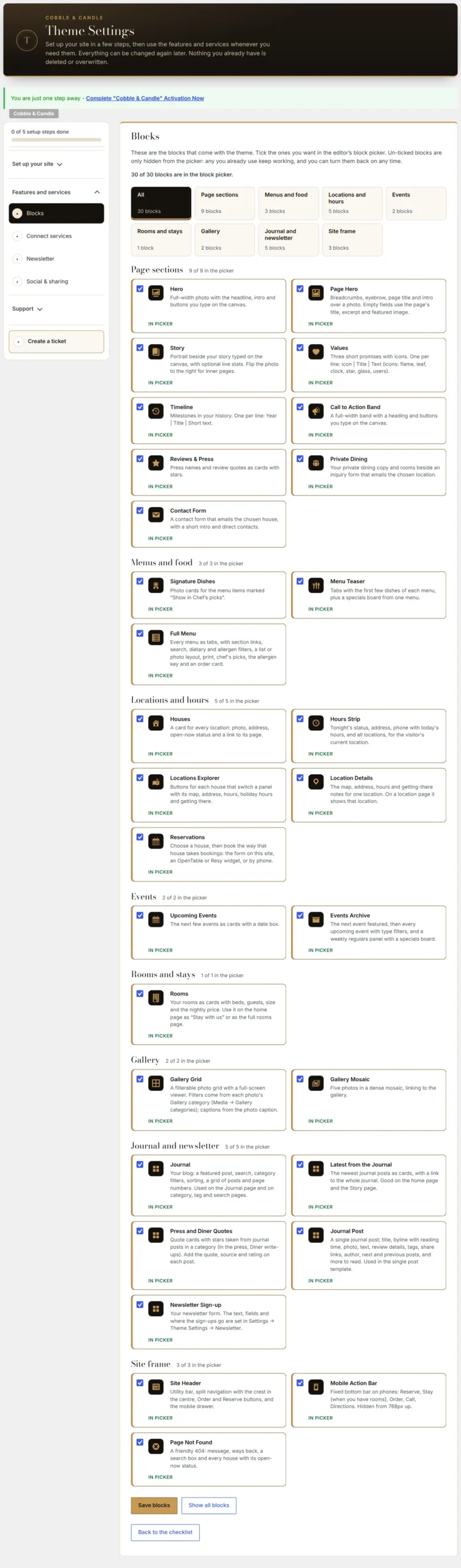
I also added a way to choose which of the theme’s blocks appear when you’re building a page. Under Settings → Theme Settings → Blocks, owners can hide the blocks they don’t need from the list. Existing pages keep working; hiding a block doesn’t remove it from the website. That might sound like a small thing, but a shorter list is easier to use than one full of options you’ll never touch.
The setup checklist follows the same thinking. It shows what’s finished, what’s missing, and a “Fix this” link that takes you to the right place. Someone setting up opening hours shouldn’t need to remember which WordPress menu holds that setting.
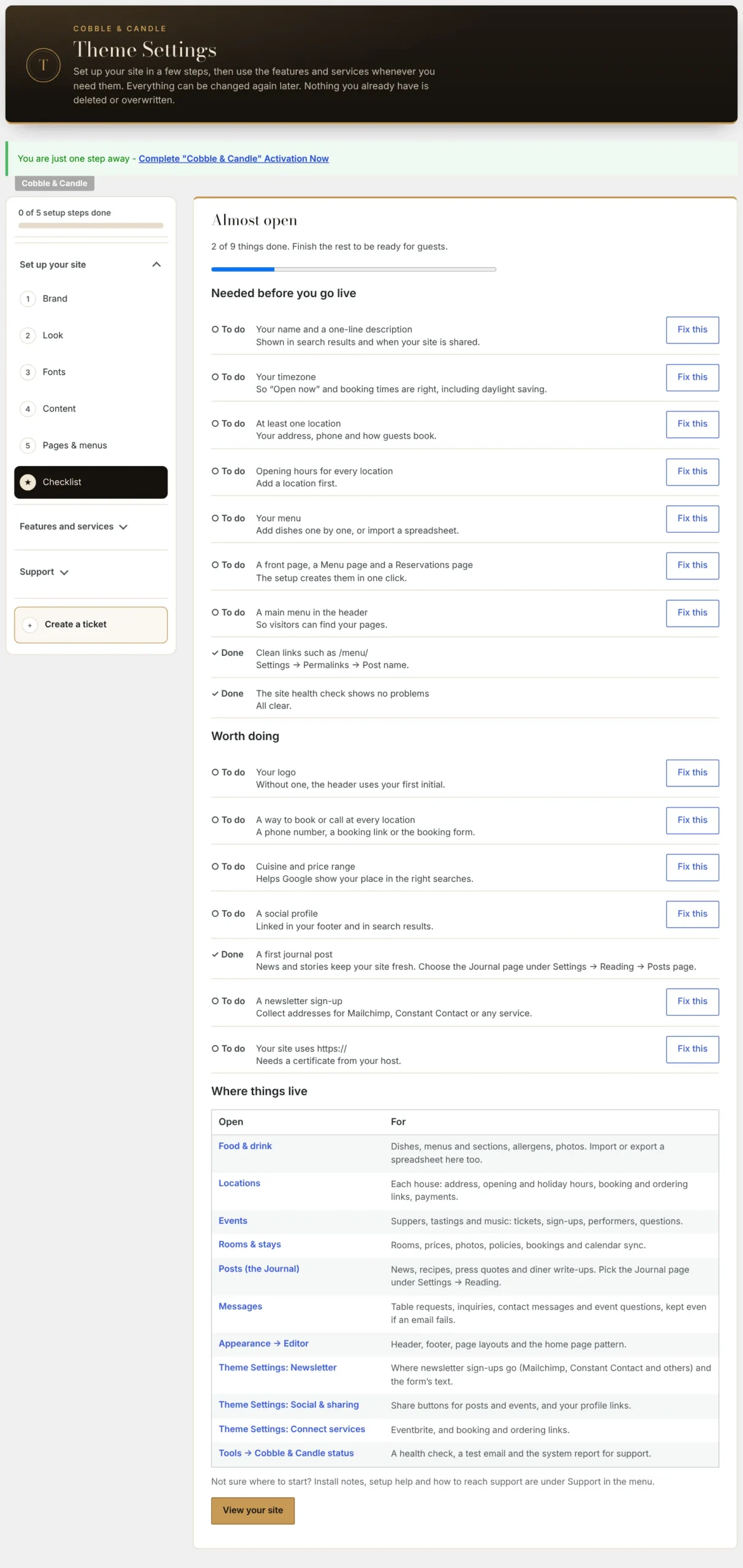
The Cobble & Candle documentation repository on GitHub explains these screens, along with the menu, hours, and setup workflows. The documentation is public so you can see how the theme is meant to work before buying; the theme’s source code itself is private.
The theme handles the look of Cobble & Candle, while its companion plugin keeps restaurant information such as menus and hours separate from the page design. It’s a practical choice, and I think Gutenberg is moving toward the same idea: let people change what needs changing without making them manage the entire layout. That’s my take on the release, not a claim that I’ve personally tested every new feature. For all the changes, see the official Gutenberg 24.4 release notes or my WordPress 7.2 overview. If your site works well today, there’s no need to chase the latest Gutenberg plugin. If you’re building something other people will maintain, these editing improvements are worth testing.

Comments
No comments yet. ASCII, code, and plain punctuation are welcome.