
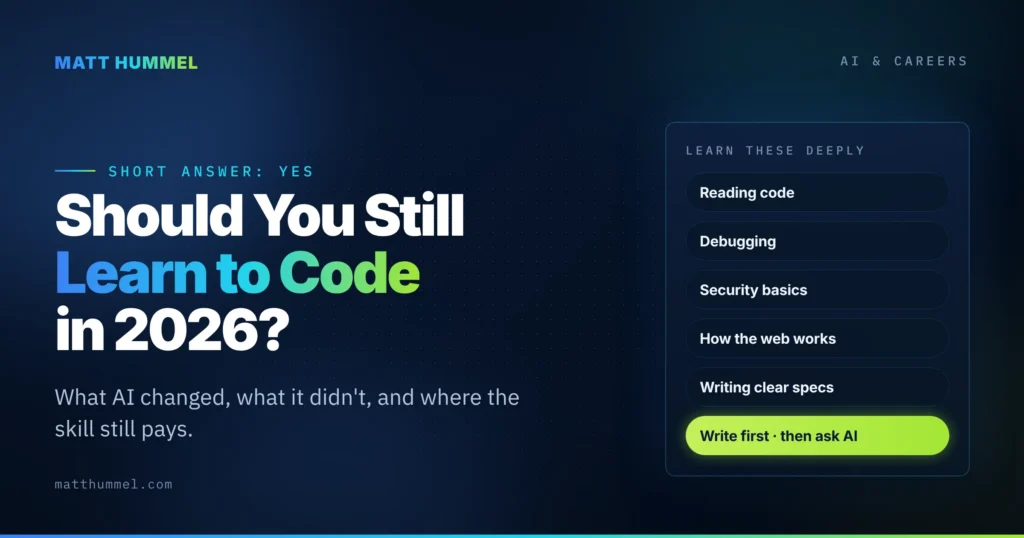
Yes, you should still learn to code in 2026. But the reason changed. You are no longer learning to type code faster than a machine. You are learning to read it, judge it, and catch what it gets wrong. AI writes a lot of code now. It does not know when it is wrong. That job is still yours.
I build WordPress sites for a living, and I use AI coding tools every day. This is not a “robots are coming for your job” post, and it is not a “learn to code or get left behind” post either. It is what the research and my own work say about where the skill still pays.
What did AI change about why you’d learn to code in 2026?
Three things, and they all point in the same direction.
1. Writing got cheap. Reviewing got expensive.
Ask an AI tool for a contact form, a loop, or a database query and you get working-looking code in seconds. The bottleneck moved. Now the slow part is checking whether that code is correct, safe, and does what you meant.
The Stack Overflow 2026 survey makes this plain. Only 16% of developers trust AI output for most tasks, and nearly half say they trust it only when they can check it quickly. The top complaint is “plausible but wrong” code. You cannot spot plausible-but-wrong code if you cannot read code.
2. Feeling fast is not the same as being fast.
In 2025, the research group METR ran a careful experiment. Sixteen experienced developers worked on 246 real tasks in their own codebases, with and without AI. They predicted AI would make them 24% faster. It made them 19% slower. And after the study, they still believed it had sped them up by 20%.
That gap between feeling and measuring is the single most useful thing a beginner can know about AI tools. The code looks done. It is not done.
3. Using AI to skip the learning actually skips the learning.
In January 2026, Anthropic published a controlled study with 52 mostly junior engineers. Half learned a new Python library with AI help. Half coded by hand. On the quiz afterward, the AI group scored 50%. The hand-coding group scored 67%. The AI group was not meaningfully faster, either.
So the tool that feels like a shortcut through learning is, at least for new material, a detour around it. That does not mean never use AI while learning. It means use it to explain, not to replace.
What AI still gets wrong (and why it matters for you)
AI coding tools fail in patterns. Once you know the patterns, you know what to study.
| What AI does well | Where it falls apart | The skill that catches it |
|---|---|---|
| Boilerplate, setup, config files | Security: missing auth checks, unescaped output | Reading code for intent, not just syntax |
| Small, well-described functions | Edge cases nobody mentioned in the prompt | Testing and asking “what if” |
| Explaining unfamiliar code | Made-up function and hook names that look real | Knowing where the docs are and checking them |
| Drafting tests and comments | Vague requirements it fills in with guesses | Writing clear specs before writing code |
| Converting between formats or languages | Anything stored in a database or runtime state it cannot see | Debugging with logs and a local environment |
The security row deserves its own line. CodeRabbit analyzed 470 open-source pull requests in late 2025, 320 with AI help and 150 without. AI-assisted PRs averaged 10.8 issues each versus 6.5 for human-only, and they had 2.74 times as many cross-site scripting (XSS) flaws. XSS is a beginner-level concept: never trust user input, always escape output. AI skips it constantly. A person who knows the rule catches it in seconds.
In WordPress land, I see this every week. AI will happily write a REST endpoint with permission_callback => '__return_true', which means anyone on the internet can call it. It will treat a nonce as a permission check, which it is not. It will invent hooks like save_posts or wp_init that register silently and never run. None of that throws an error. A developer who understands actions, filters, and capabilities spots all three on sight.
If you learn to code in 2026, what should you focus on?
Learn the parts of coding that are about judgment. Spend less time on the parts that are about typing.
Learn these deeply
- Reading code. Open real projects. Trace what a function does before you change it. This is the core skill of the next decade.
- Debugging. Logs, breakpoints, and a local environment you control. AI cannot see your runtime. You can.
- Security basics. Input sanitizing, output escaping, auth and permission checks, keeping secrets out of code. Four rules cover most of what AI gets wrong.
- How the web works. HTTP, the request lifecycle, caching, what a browser does with your HTML and CSS. Frameworks change. This does not.
- Writing clear specs. Vague prompts produce confident guesses. The better you describe the problem, the better the output, whether a human or an AI is reading it.
Learn these just enough
- Syntax trivia and exact function signatures. Look them up. Verify them against the official docs.
- Scaffolding and boilerplate. Let the tool do it, then read every line it produced.
- Memorizing a framework’s every option. Know the shape, know where the docs are.
A simple rule for using AI while you learn
Write it yourself first. Then ask AI to review it, explain it, or show another way. If you flip that order, you get the Anthropic result: fast now, weaker later.
And when you do use AI output, run it. Test it as a logged-out user. Try the empty input, the giant input, the wrong type. That five minutes is where the real learning happens.
Does this change which language or path to pick?
Not much. The fundamentals transfer. But a few things matter more now:
- Pick a stack with good documentation. You will spend a lot of time checking AI output against the docs. WordPress, PHP, JavaScript, and CSS all have thorough official references. That is a real advantage.
- Build things that run. A deployed site teaches more than a tutorial. Set up a local environment early so you can break things safely.
- Learn one thing to the bottom. Depth in one area (say, how WordPress handles a request) teaches you how to go deep anywhere else. Shallow knowledge of ten tools teaches you to depend on AI for all ten.
If you want a concrete path: HTML and CSS first, then enough JavaScript to be dangerous, then a backend you can actually ship with. For a lot of people, that backend is WordPress, because it is everywhere and the jobs are real. More on that path in future posts.
The honest take for business owners and career switchers
If you run a business and want to tweak your own site, learning the basics is more worth it now, not less. AI will write the snippet. You need enough knowledge to know whether to paste it. “Does this let strangers write to my database?” is a question AI will not ask for you.
If you are switching careers, the entry-level job has changed. Low-complexity work is being automated, and the roles that remain expect you to review and ship AI-assisted code safely. That is a higher bar than “can you write a for loop.” It is also a bar you can clear with the fundamentals above and a portfolio of things that actually run.
The question “should I learn to code in 2026” has the same answer as “should I learn to write in the age of spellcheck.” The tool handles the easy part. It raises the value of the hard part. Learn the hard part.
Quick answers to common questions
Will AI replace programmers?
It is replacing the typing, not the thinking. The measurable trend so far is that simple, well-defined coding tasks get automated while demand grows for people who can review, secure, and ship AI-assisted code. That is a shift in the job, not an end to it.
Is it too late to start learning to code?
No. The fundamentals (how the web works, how to read and debug code, how to keep user input from hurting you) are the same ones that were worth learning ten years ago. AI makes them more valuable because it produces more code that needs those skills applied to it.
Should beginners use AI tools at all?
Yes, with one rule: write first, then ask. Use AI to explain errors, suggest alternatives, and review your work. Avoid letting it write the first draft of anything you are trying to learn. The research is clear that delegation while learning lowers what you retain.
Which is better to learn first, WordPress or a JavaScript framework?
Whichever one you can ship something real with sooner. WordPress has the edge for beginners who want to build client sites: thorough docs, a huge job market, and a lot of AI output to review and fix. Frameworks make sense once you have the fundamentals and a reason to need them.
Next steps: read my guide to modern WordPress development in the age of AI for what this looks like in a real stack. And if you have an AI-built site you are not sure is safe, I can take a look.

Comments
No comments yet. ASCII, code, and plain punctuation are welcome.