Planning and roadmap
The release squad is named and a roadmap post lists what the team hopes to ship. Treat it as a wish list. Items that are not ready move to a later release.
What you get
A few a month. Unsubscribe from any email.
Sign upRelease watch
Every feature planned for the next WordPress release, the beta and RC schedule, and the latest dev notes, all in one place. It updates itself twice a day from Make WordPress Core.
Release watch · auto-updated
From the official roadmap. Items ship only if they are ready in time, so some will move to a later release. Read the roadmap
While accessibility efforts run through nearly every area of this release as a matter of course, a few pieces of dedicated, high-effort work stand out for 7.2:
The 7.1 cycle gave clear guidance that AI features must first demonstrate clear adoption and practical value before being considered for Core. As a result, the work below is being pursued in the AI plugin without a guarantee of landing in 7.2. If you’re keen to see these features graduate into Core, the best way to help is to use and test the AI plugin and share feedback.
Continue refining the existing experimental abilities, explore write abilities, and expand read-only coverage to resources such as media, taxonomies, and comments.
Update the MCP Adapter for the latest MCP specification while keeping WordPress Ability definitions independent of protocol revisions.
Standard MCP Adapter distribution
Publish the adapter in the WordPress.org Plugin Directory so it can be installed and updated like any other plugin.
Let administrators enable MCP through the AI plugin with minimal setup, including installing the adapter and controlling which abilities are exposed.
Explore abilities in browser-based agent workflows tied to the current WordPress interface and page state.
Develop a model for agents to have auditable identities, appropriate permissions, and access that can be managed independently of human accounts.
Test reusable site context and editorial guidance across multiple AI features and abilities.
Embeddings and semantic search
Build shared embedding support in the AI plugin, including generation, storage, and background synchronization, to power meaning-based search and responses grounded in site content.
Add streaming support to the PHP AI Client so applications can display generated content as it arrives, while laying the groundwork for broader WordPress and hosting support.
DataViews, DataForms iteration
Extensibility is the main priority with work underway to evolve the initial view config API work with view/form config registered on the server, plus registering fields and actions on the server. Real screens in the experience drive the direction of…
In line with defensive design best practices, this work aims to make error messages clearer and more diagnosable, and to add a copy button so an error is easier to search for or share.
Evolve Navigation editing in Site Editor sidebar
Make the Extensible Site Editor Sidebar a more complete surface for common menu editing tasks, continuing the editing-experience improvements started in 7.1.
Work continues on a new, extensible foundation for the Site Editor, built on the wordpress/boot routing package and already nearing feature parity with today’s editor. Beyond a rebuild, it opens the Site Editor up to third parties for the first time, with a…
After landing the omnibar in 7.1 to provide more consistency across various editing interfaces, more iterations are planned for 7.2, including replacing dashicons with SVG Icons, improving the command palette, continued accessibility review, and continued…
After being punted from WordPress 7.1, another attempt is underway to land a new “On This Day” widget that resurfaces past content, a popular feature across many different platforms.
A new block adds native semantic description list support to the block library through three static blocks: core/description-list serializes to , core/description-term serializes to , and core/description-detail serializes to . This follows the same parent…
Complete the work of adding keyword search to the Icon Block. Currently, only the label is searched. Keyword search, for example, allows for the “menu” icon to be found by typing in “hamburger”, “navigation”, or “list”.
The Interactivity API provides a standard way for developers to add interactions to the front end of their blocks and two main initiatives are underway to add to the power of the Interactivity API.
Work continues to make Gutenberg fully support React 19, with types, ecosystem dependencies, and rendering fixes largely landed. This is unlikely to fully land for WordPress 7.2 but is being noted here for broader awareness for when it does in a future…
Take the long-experimental Table of Contents block stable by moving it to server-side dynamic rendering, so the editor and front end share one source of truth for headings.
Collaborative editing is intentionally not on the roadmap for 7.2, even as work continues alongside this release cycle. As in 7.1, it’s clear more time is needed for a number of architectural decisions, and rather than list it here only to pull it later, it’s being left off entirely. You can follow the work in this iteration issue, and everyone is encouraged to join the collaborative editing…
Notes iteration: suggestions, emojis, and more
Notes (aka block commenting) have a range of slated improvements that aim to make Notes more discoverable, more powerful, and easier to use. Suggestion mode, where one can leave suggested edits to be accepted or rejected as notes, is the centerpiece of this…
Read Introducing Ipsum, the new default theme for more details.
A broad quality-of-life sweep fixing dozens of small but persistent writing-flow, selection, paste, drag-and-drop, and mobile annoyances in the block editor. This is part of a continual focus to make writing great in WordPress.
Customize form elements in Global Styles
Forms and their elements, like buttons or text input fields, are a common use case for websites. The work for 7.2 aims to give users the ability to style common form elements consistently in Global Styles, without writing custom CSS or editing theme.json by…
Expanded and consolidated block supports
Work continues on new block supports and design tools (backgrounds, dimensions, position), including continuing the consolidation of ad hoc block controls in favor of more consistent supports. All of this work makes the foundation of block supports more…
Responsive style states for blocks iteration
After responsive styling was introduced in 7.1, this cycle focuses on expanding which controls support states, adding a public API for third party blocks with custom controls to work with responsive styling, and refining the experience when switching into and…
Custom states work allows users to style the “active” item in interactive blocks, like the current page in a navigation menu, directly from the editor. The focus of this release is on adding a -current custom state for Navigation Link and the Tabs block, as…
Currently, any block that has options set in Global Styles don’t reflect those values in their settings. Work is underway to change that so, if a paragraph block is set to red globally, when a user opens the block settings for a paragraph block the red color…
As a reminder, client-side media provides a progressive enhancement to the current server-based approach to media processing and delivers more consistent media processing across WordPress installs, regardless of where a site is hosted. For this cycle, the…
Dynamic galleries and media inserter
This work focuses on a few pieces: a redesign of the media inserter with a focus on a more scalable experience for browsing and adding images for sites with large media libraries, expanding sources for the dynamic gallery block variation, and bringing sorting…
After landing in WordPress 7.1, for this iteration, the focus is on a better experience for attached media and tracking the relationship between originals and cropped derivatives. For the latter, this work aims to establish a more formal lineage tracking…
For this cycle, the focus is on elimination of script/style concatenation in favor of prefetching and enhanced responsive images. If you’d like to help test the latter, please use the Enhanced Responsive Images plugin from the Performance team and give…
The focus of this cycle is on polishing the visual revisions experience that shipped in 7.0 so comparing and restoring changes feels effortless.
Application passwords improvements
This work covers security hardening and UX refinements for Application Passwords, from better local/HTTPS environment detection to user notifications and safer default role handling. Below are a prioritized list of tasks:
Send email notification when an application password is added
Improved HTML processing
Work continues to harden how WordPress parses and processes HTML, building on the HTML API to make handling of markup safer and more reliable throughout Core.
WordPress has no first-class way to store a credential and a recent proposal outlines a Secrets API to solve this problem, along with WP-CLI support, with a proper UI planned for a future release.
Sudo mode: reauthentication for specific tasks
Initial work is starting on the possible introduction of a “sudo mode” feature, which can gate highly privileged administrative actions behind a re-authentication prompt even when you’re already logged in. Further details, a proposal, and a call for…
What’s new in Gutenberg 24.2? (14 October)
This release comes with a new place for notes: they now float in a margin next to the content, so collaborating no longer means closing the Settings sidebar. Adding a category, a tag, or a post to a…
NO_BACKSLASH_ESCAPES SQL mode is now turned off by default in WordPress 7.2
WordPress 7.2 adds NO_BACKSLASH_ESCAPES to the list of SQL modes that WordPress doesn’t support. WordPress already turns off some modes, such as STRICT_ALL_TABLES, TRADITIONAL and ANSI, when it…
WordPress 7.2 Release Party Schedule
WordPress 7.2 is scheduled for release on December 8, 2026! Below is the proposed calendar with expected start times for each release party, and the release squad contributors involved in release…
What’s new in Gutenberg 24.1? (30 September)
This version is all about design tool consistency, with about 140 dedicated PRs. Background image, size and gradient, shadow, borders, link, heading and button colors, typography and text columns now…
WordPress 7.2 is set to be released in early December 2026. Notes leads the way with the ability to add suggestions and emoji reactions, offering more direct and interactive collaboration. Dedicated…
Free checklist
The feature list tells you what is coming. This checklist tells you what to do about it. It is the same pass I run on client sites before every major update: 30 checks across four phases, from the first beta to the week after release day.
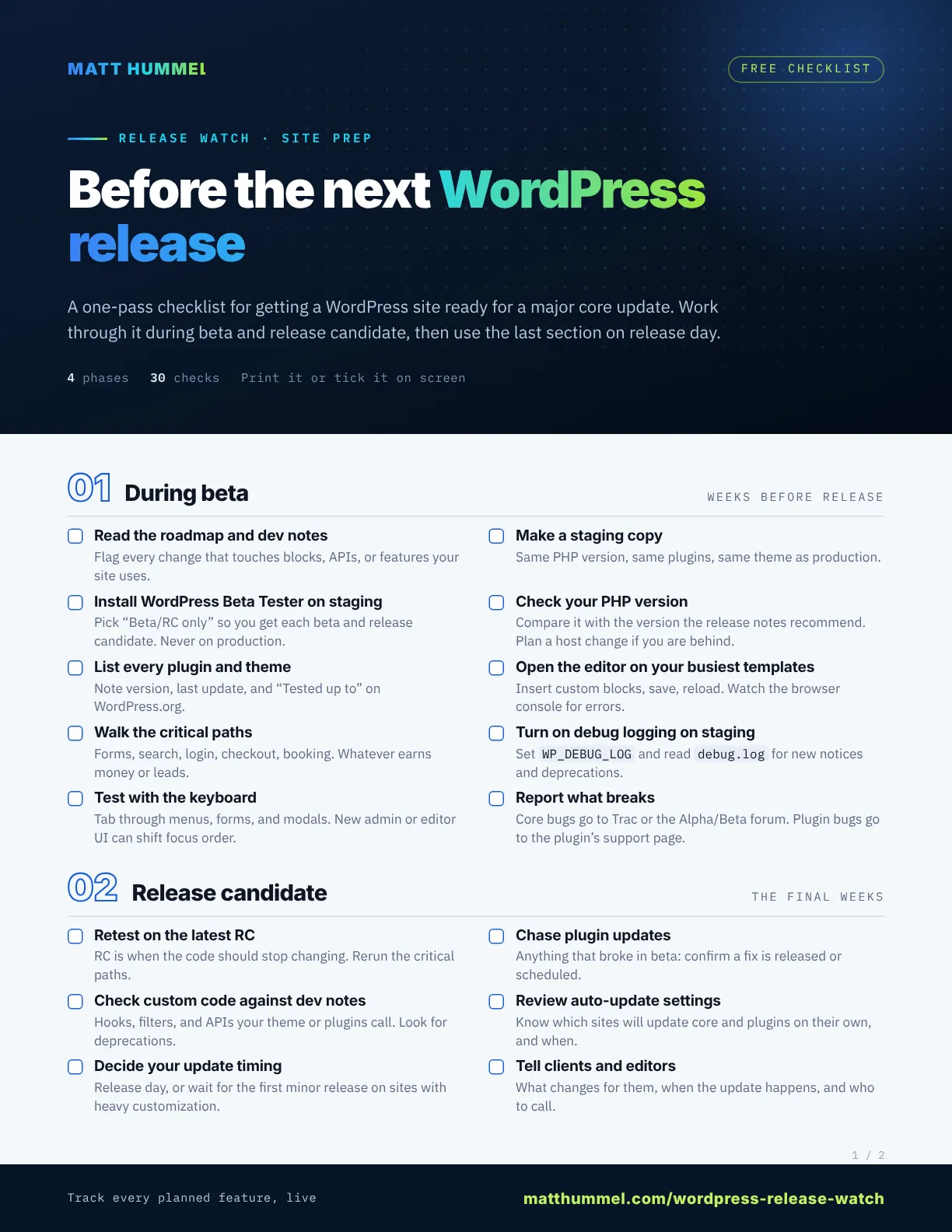
Two printable pages, with WP-CLI commands and space for notes. Free when you join the newsletter.
How it works
Every major version follows the same path, set out in the Make WordPress Core release cycle handbook (opens in a new window). Knowing where the next WordPress release sits on that path tells you how much the feature list above can still change.
The release squad is named and a roadmap post lists what the team hopes to ship. Treat it as a wish list. Items that are not ready move to a later release.
New features stop going in. Testers run the betas and report bugs. This is the best time to test your own plugins, themes, and custom blocks.
Strings freeze and work narrows to fixing regressions. If the next WordPress release is going to break something on your site, an RC should show you.
After a final dry run, the new version shows up under Dashboard → Updates. The schedule at the top of this page counts down to it.
Bug fix and security releases follow as needed. By default, WordPress installs these on its own, so most sites get them without anyone clicking a button.
Developers explain API changes, new hooks, and deprecations in dev notes on Make Core. The latest ones are pulled into the feed above.
Test early
You do not have to wait for release day to find out what breaks. Run the beta on a copy of your site and you get weeks to fix problems instead of hours.
Prefer the command line? WP-CLI can move a staging site to the latest development build in one line. Never run this on production.
wp core update --version=trunkKeep reading
This page tracks the plan. These posts go deeper on what has shipped or is about to.
Questions
The date and countdown are in the banner and schedule at the top of this page. They come from the official release schedule on Make WordPress Core and update automatically, including when a date slips.
No. The roadmap lists what the team plans to ship. Anything not ready in time moves to a later release. Once beta starts, new features stop going in, so the beta is a far better guide than the roadmap.
On a simple site with a full backup, usually yes. On a site with custom code, a store, or a lot of plugins, test on staging first or wait for the first minor release, which tends to fix early bugs.
During beta, the team fixes bugs in new features but adds nothing new. A release candidate is meant to be the final code. Only regressions get fixed, so what you see in an RC is close to what ships.
Minor and security releases install automatically by default. For major releases, check Dashboard → Updates: it shows whether the site updates to every new version on its own or only to maintenance and security releases. Your host or a management tool may change this.
Twice a day. It reads the roadmap, release schedule, and dev notes from Make WordPress Core, so a feature that gets pulled or a date that moves shows up here within hours.
Need a hand?
I test major WordPress releases on staging, fix what breaks, and update production when it is safe. Tell me about your site.
Remote · within one business day (ET)